 Features / Board Tools
Custom Canvas Settings
Overview
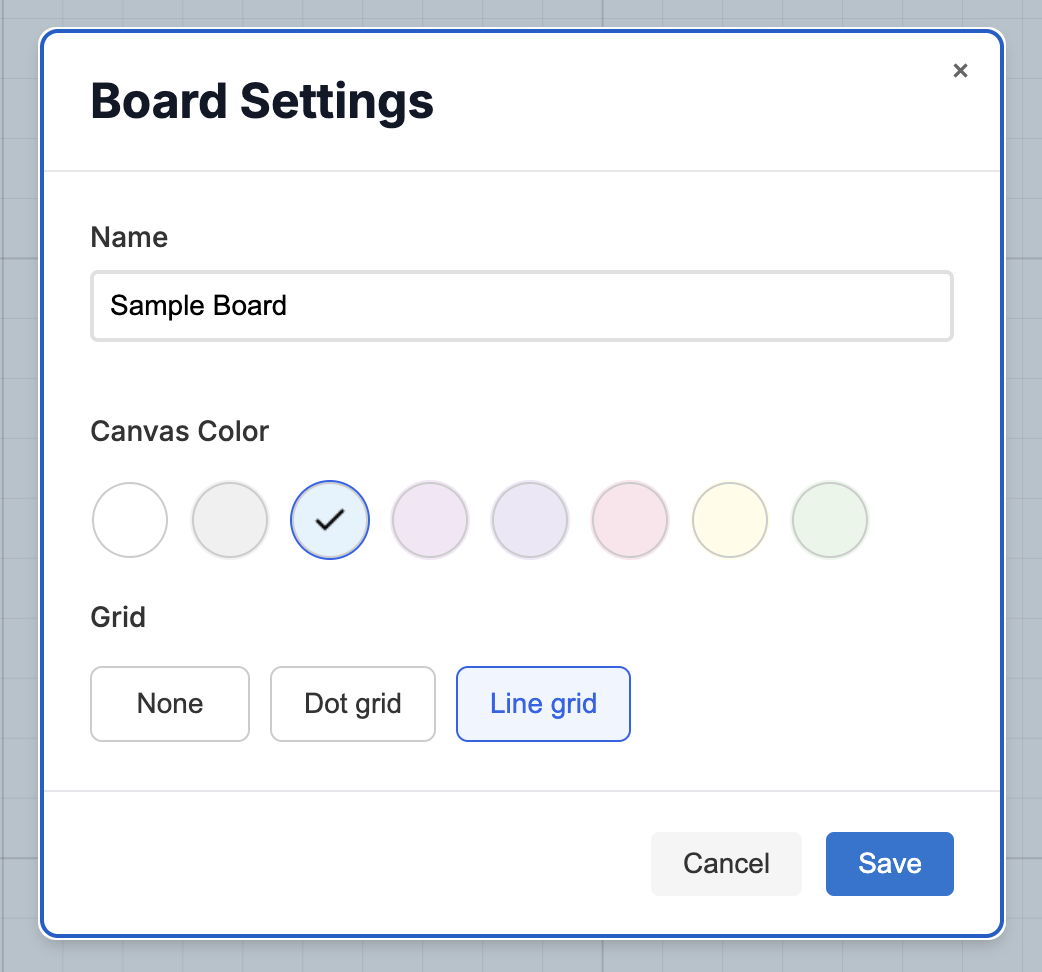
Section titled “Overview”Custom Canvas Settings let you tailor your Bizby workspace to match your preferences and workflow. Choose from different background colors and grid styles to create the perfect environment for your team’s collaboration needs.
Key Features
Section titled “Key Features”- Background Colors - Choose from multiple background color options
- Grid Styles - Select different grid patterns for your canvas
- Instant Preview - See changes applied immediately
- Saved Preferences - Your settings are remembered for each board
How to Use
Section titled “How to Use”- Open any board in Bizby
- Click the board name in the top menu to open the board settings dialog
- Adjust your preferred:
- Color
- Grid
- Changes apply instantly to your canvas
Your canvas settings are saved automatically and will be remembered the next time you open the board.


Background Options
Section titled “Background Options”Available Colors
Section titled “Available Colors”Choose from a variety of background colors:
- Default - Classic clean white background
- Gray - Subtle light gray (#f0f0f0)
- Blue - Soft light blue (#e3f2fd)
- Purple - Gentle light purple (#f3e5f5)
- Violet - Soft violet (#ede7f6)
- Pink - Light pink (#fce4ec)
- Yellow - Soft yellow (#fffde7)
- Green - Light green (#e8f5e9)
When to Use Different Backgrounds
Section titled “When to Use Different Backgrounds”Default (White)
- Professional clean look
- High contrast for maximum readability
- Best for presentations and client-facing boards
Gray
- Reduces eye strain during long sessions
- Softer than pure white
- Great for daily team work
Blue
- Calming, professional atmosphere
- Good for strategy and planning sessions
- Easy on the eyes for extended use
Purple/Violet
- Creative and modern feel
- Great for design and brainstorming sessions
- Helps differentiate board types
Grid Styles
Section titled “Grid Styles”Available Grid Options
Section titled “Available Grid Options”- None - Clean canvas with no guides
- Dot Grid - Subtle dots for alignment
- Line Grid - Clear horizontal and vertical lines
Best Practices
Section titled “Best Practices”- Test Different Settings - Try various combinations to find what works best
- Be Consistent - Use similar settings across related boards
- Consider the Purpose - Match the canvas style to the board’s purpose
- Think About Sharing - Choose settings that work well for all collaborators
Related Features
Section titled “Related Features”- Custom Colors - Use custom colors for shapes and sticky notes
- Feature Overview - See all Bizby features