 Features / Import & Export
Mural Board Import (Beta)
Overview
Section titled “Overview”Bizby now supports importing boards directly from Mural. The import preserves your board layout, sticky notes, shapes, text, connectors, images, and styling — so you can migrate existing work into Bizby without starting from scratch.
What Gets Imported
Section titled “What Gets Imported”Fully Supported
Section titled “Fully Supported”- Sticky Notes — Colors, text content, positioning, and HTML text formatting
- Text Widgets — Standalone text, textboxes, and titles with:
- Font sizing and alignment
- Color preservation from HTML inline styles
- Bold, italic, and underline formatting
- Shapes — Rectangles, circles, ellipses, triangles, diamonds with:
- Fill colors and borders
- Border width and styling
- Text labels
- Arrows & Connectors — Lines connecting shapes with:
- Connection bindings to shapes
- Arrowhead types (single, double, none)
- Line types (straight, curved, elbow/orthogonal)
- Colors and styling
- Label text
- Images — Image assets proxied through the server to avoid CORS restrictions
- Areas — Grouping containers (converted to frames)
Special Handling
Section titled “Special Handling”- Icons with URLs — Converted to image shapes if they have image URLs
- Icons without URLs — Built-in Mural icons (referenced by icon key) are skipped as they have no accessible image files
Text Color Preservation
Section titled “Text Color Preservation”Mural embeds text colors in HTML inline styles rather than in API style fields. Bizby automatically extracts these colors during import to preserve your exact text styling.
Prerequisites
Section titled “Prerequisites”Import requires OAuth authentication with Mural. You’ll sign in with your Mural account to grant Bizby read-only access to your boards and workspaces.
How to Import
Section titled “How to Import”- Open a Bizby board and click the board settings hamburger menu then select Import from, then Mural board…
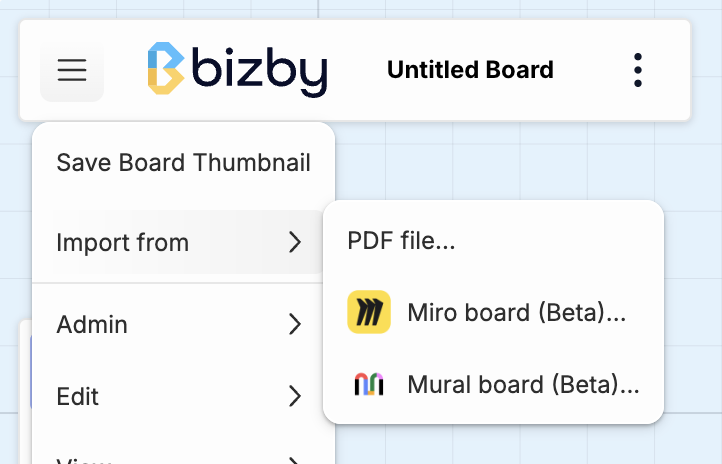
- If this is your first import, you’ll be prompted to sign in with Mural via OAuth
- Select a workspace, then browse your Mural boards
- Select a board to import and review the widget count
- Click Import — Bizby will fetch all widgets and place them on your board
- The view will automatically zoom to fit the imported content
Arrow & Connector Handling
Section titled “Arrow & Connector Handling”Arrows imported from Mural preserve their connection bindings to shapes. Connection points are detected and mapped to appropriate anchor positions on the target shapes.
Arrow directions: Mural’s “single” arrow type places the arrowhead at the start (origin), not the end — this is preserved during import.
Line types:
- Orthogonal (elbow) arrows use edge snapping
- Curved arrows include bend curves
- Straight arrows connect directly
Color & Style Mapping
Section titled “Color & Style Mapping”Mural’s RGBA hex colors are mapped to Bizby’s closest matching named colors. Fill colors, border colors, text colors, and opacities are preserved.
Image Handling
Section titled “Image Handling”Mural stores images in Azure blob storage with temporary URLs that expire after 5 minutes. Bizby automatically:
- Proxies image downloads through the server to avoid CORS restrictions
- Uploads images to Firebase storage for permanent hosting
- Links the uploaded images to your Bizby board
This ensures images remain accessible after import, even after the original Mural URLs expire.
Z-Order & Layering
Section titled “Z-Order & Layering”Mural’s stackingOrder field determines which widgets appear in front or behind others. Bizby preserves this layering during import, with arrows always placed on top of other shapes for visibility.
Tips for Best Results
Section titled “Tips for Best Results”Known Limitations
Section titled “Known Limitations”- Built-in icons — Mural icons referenced by icon key (without image URLs) cannot be imported
- File attachments — File widgets are not supported
- Tables — Table structures are not imported
- Comments — Board comments are not included in the import
- Rich text — HTML is parsed for basic formatting (bold, italic, paragraphs); complex formatting may be simplified
Related Features
Section titled “Related Features”- Arrow Handles — Precision arrow drawing and connection tools
- Custom Colors — Custom hex colors for shapes and notes
- Miro Board Import — Import boards from Miro
- Features — See all Bizby features